
Friday, 30 September 2016
UI (User Interface)

Thursday, 29 September 2016
Platforms for my game
I would love if my game could end on steam when its fully released. I believe that steam is one of the biggest gaming platforms out there and making it onto it would be a huge achievement.
Steam would be my target platform.
Steam would be my target platform.
Looking for a location for my game.
.svg/2000px-California_economic_regions_map_(labeled_and_colored).svg.png)
In todays lesson i was able to decide on where my game will be based in, i went with California in the US. I decided to go with Cali because I feel like its a perfect place to have a racing game based in. Im still not sure whether i want to make the whole of California or only one of the towns, If i figure out how to import a heightmap i will be then able to see if I'm capable of making the whole of that state or just one of the towns. I played around with unity today
Wednesday, 28 September 2016

Monday, 26 September 2016
Pre-Production
For my project, I am estimating that the pre-production of my project will take up to 4 weeks so until the 24/10/16. I think that 3 weeks weeks is a plenty of time to gather a lot of ideas for my project and also it will be enough time for me to keep on testing and learning UE4. This time will also allow me explore other possible ideas, e.g. if i wanted to make a 2d game, maybe? Also i still need to think whether I actually want to make a racing game or something else.
Day 4: Continuing with that i was doing on Day 3

Friday, 23 September 2016
Makey Makey
What is Makey Makey?
Makey Makey allows you to Turn everyday objects into touch-pads. It works by connecting a hardware to your computer by usb and the attaching the crocodile clips to what ever you want your interface to be.

Research 3 examples of makey makey interfaces that you liked. talk about it + pictures
i really liked the banana piano interface because i thought its really cool to play piano on bananas. It is also really interesting that all the bananas are in size order. Must've been difficult and time consuming to search for those.
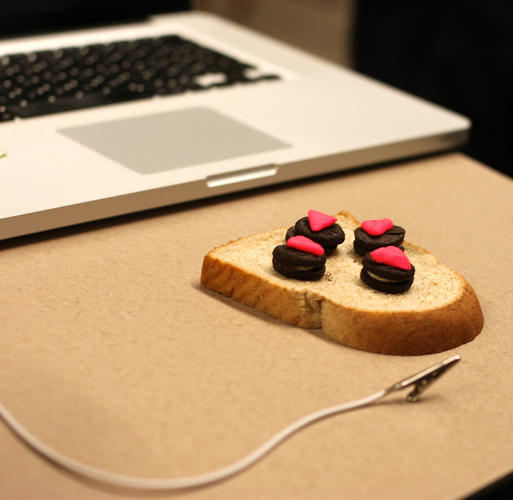 This interface looks pretty interesting in my opinion. its basically a Controller made with a piece of bread and some play-doo. Im guessing you would have to go easy on the button smashing as this would be pretty easy to destroy.
 This image represents an interface made out of strawberries, the player uses the strawberries as piano buttons, I think this is a decent idea however i also believe the player could've used them for something else, as i believe most of the people that tried makey makey ended up actually connecting something to play on the piano
Makey Makey allows you to Turn everyday objects into touch-pads. It works by connecting a hardware to your computer by usb and the attaching the crocodile clips to what ever you want your interface to be.

Research 3 examples of makey makey interfaces that you liked. talk about it + pictures
i really liked the banana piano interface because i thought its really cool to play piano on bananas. It is also really interesting that all the bananas are in size order. Must've been difficult and time consuming to search for those.

Monday, 19 September 2016
Day 3: Generating ideas/ gaining knowladge
Today i was looking at some YouTube videos to get to know Unreal Engine 4. I found this one person that made a whole series about Unreal Engine 4, I think i will watch some of his videos just so i can learn the basics of if. I feel like UE4 is a very powerful program that allows you to create pretty much any game that you can possibly imagine doing. Here is a link to one of the videos which i was talking about earlier. https://www.youtube.com/watch?v=PaneDlXbgnA .
I have also made a house in unity while i was figuring out how to place and move objects. Furthermore i have added textures.

I have also made a house in unity while i was figuring out how to place and move objects. Furthermore i have added textures.

Friday, 16 September 2016
Day 2: Generating Ideas For My Project
Im thinking of my project to be an open world game. I was thinking about, illegal street races, in which you would approach the other driver (an AI) and challenge him to a race. If you would go on and win the race you would be able to take the car of your opponent and either use it, sell it or use the parts of that car to customize yours.
 I went onto unreal engine to have a look around and see whats what. I wanted to change the colour of the car however even though I tried for about 20 mins i was not able to change it, I find the interface really confusing
What game platforms can you produce your game for?
I am looking to make my game PC/Mac exclusive. I'm going for PC because most people actually own one, whether its a gaming PC, a mac or a crappy PC. I feel like the game will not require the pest of PC as I will probably not make the graphics as good as GTA 5 PC version has or some other new release game.

HCI = human computer interface
What game platforms can you produce your game for?
I am looking to make my game PC/Mac exclusive. I'm going for PC because most people actually own one, whether its a gaming PC, a mac or a crappy PC. I feel like the game will not require the pest of PC as I will probably not make the graphics as good as GTA 5 PC version has or some other new release game.
Thursday, 15 September 2016
Plan for Year 2
Hey guys,
 This year is the last year of the games design and development course which Ill be attending. In this year there will be 3 school terms. I'm planning on making one project which will last the whole year. Through the year i shall be on time for all the deadlines and i should also be able to do all the units for the whole year. The one project I'm planning on doing will be an open world game. In order to succeed at creating my game I shall use all the knowledge i currently have and also all the knowledge ill gain throughout the year, whether it be from reading, watching videos or practicing.

Wednesday, 14 September 2016
Subscribe to:
Posts (Atom)